Hello World 3
Introduction
As you have seen in these tutorials, Component Types have many different features which can be used when building flight software. Using the right features, and combining them in the right way, is key to producing powerful, flexible Component Types.
In this tutorial you will develop a new Component Type which will regularly report some information to the ground. It will do this autonomously, without an operator requesting it via Actions or Parameters.
You will implement this Component Type using some features you’ve already seen and some new ones which will be introduced along the way:
-
The desired information will be delivered to the ground by raising Events.
-
To raise these Events regularly and autonomously you’ll use a Task.
-
You’ll then use a Mutable Parameter, introduced in the previous tutorial, to control what information is delivered, and when.
|
In this tutorial, you will:
|
Before You Begin
The GEN1_ROOT environment variable should be set to the FSDK root directory. This is used by codegen to locate the necessary files and directories.
Open a terminal in the FSDK root directory and navigate to the Documentation/Tutorials directory using the following command.
cd Documentation/TutorialsExecute the script to set the GEN1_ROOT environment variable.
. set_gen1_root.shEcho the GEN1_ROOT environment variable to confirm it has been set to the correct directory.
echo $GEN1_ROOT|
If this command fails, check that |
Tasks
The FSDK enables the flight software you build to be naturally portable across different hardware platforms and operating systems.
This is achieved in part by using a consistent model of an execution context called a Task.
As you might expect, Tasks are part of the definition of a Component Type.
There are 3 kinds of Tasks, each with their own defined behaviour:
-
Periodic Tasks are triggered each time a fixed time interval has elapsed.
-
Sporadic Tasks are triggered when specific data is received.
-
Interrupt Tasks are triggered when a hardware interrupt occurs.
In this tutorial you will use a Periodic Task.
We use Periodic Tasks whenever periodic behaviour is required in our Components, examples include:
-
The
auto.ScheduleComponent, which makes use of a Periodic Task to autonomously execute activity defined in a schedule uplinked by operators. -
The
logging.DataLoggerComponent, which carries out periodic data logging, and uses a pair of Periodic Tasks to do so in a way that is robust to IO delays. -
The
tmtc.TMBeaconComponent, which uses a Periodic Task to regularly deliver housekeeping data via the pus (packet utilisation service).
|
In this section of the tutorial you’ll add a Periodic Task named |
|
Task behaviour is a complex subject, and more information on it is available. You don’t need more detail to complete this tutorial, but if you are curious you can refer to the following sections of the FSDK User Manual:
|
Adding the raiseEvent Task
To add a Periodic Task to a Component Type, you must add a <PeriodicTask> element to its componentType.xml.
EventRaiser currently has no Tasks, so in this case you will also need a <Tasks> element to contain the <PeriodicTask> element.
Open the EventRaiser componentType.xml. Add the following below the <!--Tasks --> comment:
<Tasks>
  <PeriodicTask name="raiseEvent" defaultPeriod="3.0">
    <Description>
      A task used to periodically raise events
    </Description>
  </PeriodicTask>
</Tasks>
This adds a new Periodic Task named raiseEvent to the Component Type, with a default period of 3 seconds. This period can be overridden when the EventRaiser Component Type is instantiated.
You must now generate the Component Type, because its definition has changed. The command for this is the same as in previous tutorials:
codegen componenttype generate components/inc/EventRaiserThis creates a Task function in the Component template file called EventRaiser_taskRaiseEvent().
Copy this function, along with its banner comment, and paste it into EventRaiser.c below EventRaiser_localFini() to maintain the function order.
Replace the TODO in the Task function with a call to UTIL_LOG_INFO() so that a message will be printed to the terminal when the Task executes.
Show the updated Task code
/*---------------------------------------------------------------------------*
 * A task used to periodically raise events
 *---------------------------------------------------------------------------*/

void EventRaiser_taskRaiseEvent
(
    EventRaiser_t *pt_EventRaiser
)
{
-   /* TODO: Insert task code here */
+   UTIL_LOG_INFO("EventRaiser.raiseEvent executed!");
}
Updating the hello_world_3 Deployment
The EventRaiser Component Type is already instantiated in the hello_world_3 Deployment. To see the new Task execute, you must also update the component instance to match the definition of the Component Type.
|
In the previous section you added a new Task to the Component type. This means every instance of that type requires an implementation of that Task to fulfill its definition. |
Open up hello_world_3/deployment.xml and update the MyEventRaiser component instance to include the new raiseEvent Task.
Show the updated MyEventRaiser component instance
<Component name="MyEventRaiser" type="EventRaiser">
  <Description>
    An instance of the EventRaiser which will periodically raise events
  </Description>
+ <Tasks>
+   <PeriodicTask name="raiseEvent" priority="0"/>
+ </Tasks>
</Component>
When adding a Task to a Deployment you must also specify its priority. This sets the priority that the operating system will apply to this Task when running multiple Tasks concurrently. The higher the number, the higher the priority.
On Linux systems we leave scheduling decisions up to the Linux scheduler. That means this value is ignored in this case, so we have set it to "0".
We could have also specified a period which would take precedence over the defaultPeriod specified in the componentType.xml. Omitting this attribute results in the defaultPeriod being used.
To test the new Task, generate, build and run the Deployment using the same approach as in previous tutorials:
 codegen deployment generate hello_world_3
 make -C hello_world_3 force target
./hello_world_3/bin/linux/hello_world_3|
You will see a warning that |
You should see the following message being printed to the terminal every three seconds:
INF: EventRaiser.c:72 EventRaiser.raiseEvent executed!Events
In the FSDK Events are used for asynchronous signalling by Components. Components may raise Events (produce them) and listen for Events (receive them). There are usually more Components raising Events than listening for them.
Events are used for many different purposes in the FSDK. Examples include:
-
Raising an Event when a mode manager enters safe mode.
-
Raising an Event when execution of an onboard schedule completes, or fails.
-
Raising an Event when some Parameter value exceeds pre-defined limits.
|
In this section of the tutorial you will define a new Event, and learn how to raise it from the Task you added in the previous section. |
Adding the SomethingHappened Event
To add an Event to a Component Type, you must add an <Event> element to its componentType.xml.
EventRaiser currently has no Events, so in this case you will also need an <Events> element to contain the <Event> element.
Open the EventRaiser componentType.xml. Add the following below the <!-- Events --> comment:
<Events defaultBaseId="10000">
  <Event name="SomethingHappened" severity="info">
    <Description>
      An event to notify the operator that something happened!
    </Description>
  </Event>
</Events>
Each Event has a numeric identifier associated with it, and the defaultBaseId is the identifier used by the first Event defined in this Component Type. Each subsequent Event is numbered sequentially from defaultBaseId.
In general defaultBaseId should be different for each Component Type which defines Events in a Deployment.
A value of 10000 here is sufficiently unique for our purposes.
When defining an Event you must also specify its severity. info is the lowest severity and is appropriate for this tutorial.
Once you have added the above XML to the componentType.xml, generate the Component Type using the same command as before.
This will generate a new header file in components/inc/EventRaiser, EventRaiser_events.h, containing the symbol needed to raise the new Event.
You will now see how the new Event can be raised.
Adding the Task Event Source
In order to raise the new Event, EventRaiser needs an Event source. To add an Event source to a Component Type, you must add an <EventSource> element to its componentType.xml.
EventRaiser currently has no Event sources, so in this case you will also need an <EventSources> element to contain the <EventSource> element.
Open the EventRaiser componentType.xml. Add the following below the <!-- Event sources --> comment:
<EventSources>
  <EventSource name="task">
    <Description>
      An event source for raising events from the raiseEvent periodic task
    </Description>
  </EventSource>
</EventSources>
Now generate the EventRaiser Component Type.
This will have generated a new function that you can call from the EventRaiser Component Implementation to raise Events. Its prototype can be found in EventRaiser_Container_package.h:
/**
 * Raise an event through the task event source.
 * @param pt_EventRaiser The EventRaiser component.
 * @param u16_EventID The ID of the event to raise.
 * @param u32_Information The information to associate with the event.
 */
void EventRaiser_Container_raiseTaskEvent
(
    EventRaiser_t *pt_EventRaiser,
    ui16_t u16_EventID,
    ui32_t u32_Information
);
You will now call this function from the raiseEvent Task to raise an Event periodically.
Raising the SomethingHappened Event
To raise the SomethingHappened Event from the raiseEvent Task, update the Task function to call EventRaiser_Container_raiseTaskEvent(), passing in EVENTRAISER_EVENT_SOMETHING_HAPPENED as the Event ID argument.
Show the updated Task code
void EventRaiser_taskRaiseEvent
(
    EventRaiser_t *pt_EventRaiser
)
{
    UTIL_LOG_INFO("EventRaiser.raiseEvent executed!");
+
+   EventRaiser_Container_raiseTaskEvent(
+       pt_EventRaiser, EVENTRAISER_EVENT_SOMETHING_HAPPENED, 0);
}
To test the updated Task, generate, build and run the Deployment.
You will see the same message as before being printed to your terminal every 3 seconds. To see the Events which the component instance is now raising, you will need to use tmtclab.
Open tmtclab, reload the SCDB and connect to the Deployment. You should see the Events arriving in the Event pane at the bottom of tmtclab's main window.
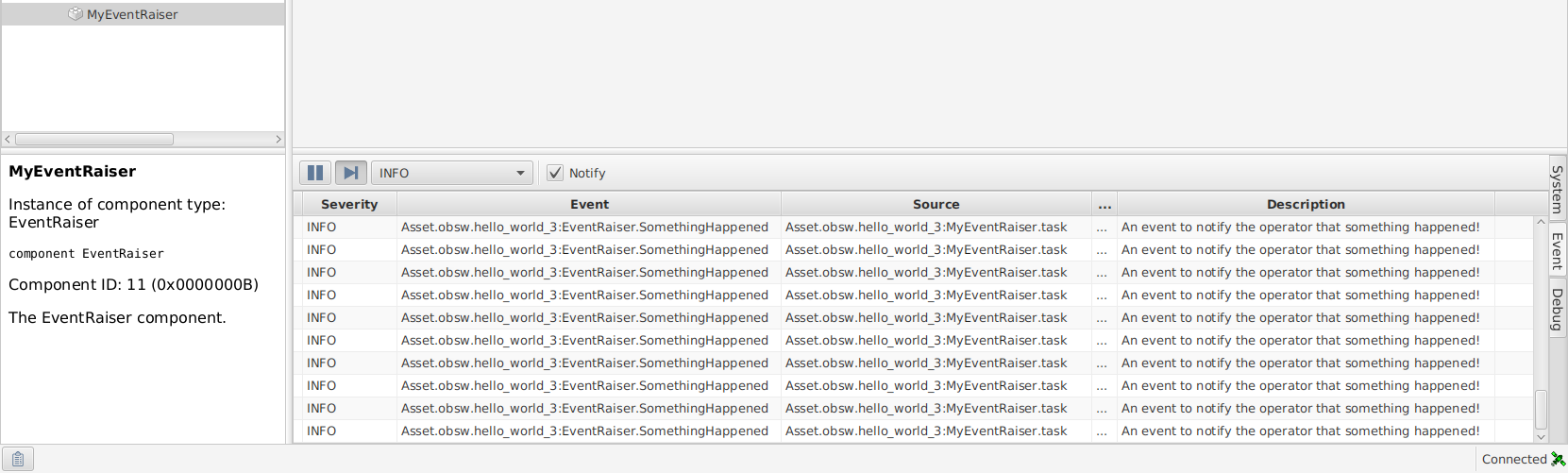
|
The At the moment, there is no logic controlling when it raises an Event. In the next section you’ll add a Parameter to control this behaviour. |
Controlling the raiseEvent Task
In the previous tutorial you learned that Parameters are used to give insight into, or control over, a component instance's behaviour, and worked with a read-only Parameter.
Parameters may also be mutable, which means they can be set externally to the Component. When implementing a Mutable Parameter you must provide a Parameter setter function as well as a Parameter getter.
|
In this section of the tutorial you will add a Mutable Parameter to the |
Adding the eventPeriod Parameter
Currently EventRaiser raises an Event every time its raiseEvent Task runs.
You will now add a new eventPeriod Parameter so that the Component Implementation raises an Event 1 in every eventPeriod` times the Task runs.
To add the new Parameter, add the following <Parameters> element to the Component's componentType.xml below the <!-- Parameters --> comment:
<Parameters>
  <Parameter name="eventPeriod">
    <Description>
      Controls how often the SomethingHappened event is raised by the
      raiseEvent task
    </Description>
    <Documentation><Markdown>
      A value of zero indicates the `SomethingHappened` event will never be
      raised.

      A non-zero value indicates the `SomethingHappened` event will be raised 1
      in every `eventPeriod` times the `raiseEvent` task runs.

      - A value of '1' raises the event *every* time the task runs
      - A value of '2' raises the event *every second* time the task runs
      - A value of '3' raises the event *every third* time the task runs
      - etc.
    </Markdown></Documentation>
    <Value type="unsigned" bits="8"/>
  </Parameter>
</Parameters>
Notice that this Parameter does not specify a value for the readOnly attribute. It is not required for Mutable Parameters as its default value is "false".
Now generate the Component Type.
In the template file you will now see EventRaiser_getEventPeriod() and EventRaiser_setEventPeriod() - the Parameter setter.
Copy and paste these functions into EventRaiser.c.
You will now use the same pattern as in the previous tutorial to store this Parameter's value.
Add a member to the EventRaiser_t (defined in components/inc/EventRaiser/EventRaiser_types.h) to hold the value of the
eventPeriod Parameter.
Use a type and name consistent with the Parameter's definition in componentType.xml.
Show the new member added to EventRaiser_t
/** The EventRaiser component */
typedef struct
{
    /** A protection lock to protect the EventRaiser state */
    Task_ProtectionLock_t t_Lock;
-   /* TODO: Add component state variables here */
+   /** Data storage for the eventPeriod parameter */
+   ui8_t u8_EventPeriod;
}
EventRaiser_t;
Set u8_EventPeriod to 0 in EventRaiser_localInit() so that the component instance does not raise the SomethingHappened Event by default.
Show the initialisation added to EventRaiser_localInit()
status_t EventRaiser_localInit
(
    EventRaiser_t *pt_EventRaiser,
    const EventRaiser_Init_t *pt_InitData
)
{
+   /* By default, disable raising the SomethingHappened event */
+   pt_EventRaiser->u8_EventPeriod = 0;
+
    /* Initialise the protection lock */
    return Task_ProtectionLock_init(
        &pt_EventRaiser->t_Lock,
        EVENTRAISER_CONTAINER_TASKING_TYPE(pt_EventRaiser));
}
Now modify the getter and setter functions you copied into EventRaiser.c earlier so they provide read and write access, respectively, to u8_EventPeriod.
As in the previous tutorial, these functions must only access the u8_EventPeriod member from within a locked section.
Show the changes to the EventRaiser_getEventPeriod() implementation
/*---------------------------------------------------------------------------*
* Get the eventPeriod parameter
*---------------------------------------------------------------------------*/
status_t EventRaiser_getEventPeriod
(
EventRaiser_t *pt_EventRaiser,
ui8_t *pu8_Value
)
{
status_t t_Status; /* The current status */
TASK_PROTECTED_START(&pt_EventRaiser->t_Lock, >_LockTimeout, t_Status)
{
- /* TODO: Implement eventPeriod get accessor */
- t_Status = STATUS_NOT_IMPLEMENTED;
+ *pu8_Value = pt_EventRaiser->u8_EventPeriod;
}
TASK_PROTECTED_END(&pt_EventRaiser->t_Lock, >_LockTimeout, t_Status);
return t_Status;
}Show the changes to the EventRaiser_setEventPeriod() implementation
/*---------------------------------------------------------------------------*
* Set the eventPeriod parameter
*---------------------------------------------------------------------------*/
status_t EventRaiser_setEventPeriod
(
EventRaiser_t *pt_EventRaiser,
ui8_t u8_Value
)
{
status_t t_Status; /* The current status */
TASK_PROTECTED_START(&pt_EventRaiser->t_Lock, >_LockTimeout, t_Status)
{
- /* TODO: Implement eventPeriod set accessor */
- t_Status = STATUS_NOT_IMPLEMENTED;
+ pt_EventRaiser->u8_EventPeriod = u8_Value;
}
TASK_PROTECTED_END(&pt_EventRaiser->t_Lock, >_LockTimeout, t_Status);
return t_Status;
}Although this Parameter doesn’t control the Event yet, you can still test the Parameter accessor functions at this stage.
To do so, carry out the following steps, which you should now be familiar with:
-
Generate the Deployment
-
Build the Deployment
-
Run the Deployment
-
Open tmtclab
-
Load the SCDB
-
Connect to the Deployment
-
Open the
eventPeriodParameter accessor dialog
Notice that the eventPeriod dialog contains both a Get current value ⬇ button and a Set current value ⬆ button. You can use these to get or set the value stored in u8_EventPeriod, respectively.
Give this a try and make sure that the Parameter value changes as expected.
Now that you can set the period of the raised Events, you need to update the raiseEvent Task to use of it.
Updating the raiseEvent Task
As described in the eventPeriod <Documentation> element you added to the componentType.xml, your goal here is to raise the Event every eventPeriod time the raiseEvent Task runs.
To implement this functionality you will need a counter to keep track of how many times the raiseEvent Task has run.
This counter will form part of a EventRaiser component instance's state, so, much like u8_EventPeriod, needs to be added to the EventRaiser_t structure.
Show the new member added to EventRaiser_t
/** The EventRaiser component */
typedef struct
{
    /** A protection lock to protect the EventRaiser state */
    Task_ProtectionLock_t t_Lock;
    /** Data storage for the eventPeriod parameter */
    ui8_t u8_EventPeriod;
+   /** Counter to track how many times raiseEvent has run */
+   ui8_t u8_TaskCounter;
}
EventRaiser_t;
As for u8_EventPeriod, set this member to 0 in EventRaiser_localInit().
Show the initialisation added to EventRaiser_localInit()
status_t EventRaiser_localInit
(
    EventRaiser_t *pt_EventRaiser,
    const EventRaiser_Init_t *pt_InitData
)
{
    /* By default, disable raising the SomethingHappened event */
    pt_EventRaiser->u8_EventPeriod = 0;
+
+   /* Start counting how many times raiseEvent has run from zero */
+   pt_EventRaiser->u8_TaskCounter = 0;

    /* Initialise the protection lock */
    return Task_ProtectionLock_init(
        &pt_EventRaiser->t_Lock,
        EVENTRAISER_CONTAINER_TASKING_TYPE(pt_EventRaiser));
}
You must now update raiseEvent to use u8_EventPeriod and u8_TaskCounter to achieve the desired behaviour.
Show the updated implementation of the raiseEvent Task
/*---------------------------------------------------------------------------*
* A task used to periodically raise events
*---------------------------------------------------------------------------*/
void EventRaiser_taskRaiseEvent
(
EventRaiser_t *pt_EventRaiser
)
{
+ status_t t_Status;
+
UTIL_LOG_INFO("EventRaiser.raiseEvent executed!");
- EventRaiser_Container_raiseTaskEvent(
- pt_EventRaiser, EVENTRAISER_EVENT_SOMETHING_HAPPENED, 0);
+ TASK_PROTECTED_START(&pt_EventRaiser->t_Lock, >_LockTimeout, t_Status)
+ {
+ /* Only raise events if eventPeriod is non-zero */
+ if (pt_EventRaiser->u8_EventPeriod != 0)
+ {
+ pt_EventRaiser->u8_TaskCounter++;
+
+ /* Once we've counted up to eventPeriod, raise the event and reset
+ * the counter */
+ if (pt_EventRaiser->u8_TaskCounter >=
+ pt_EventRaiser->u8_EventPeriod)
+ {
+ EventRaiser_Container_raiseTaskEvent(
+ pt_EventRaiser,
+ EVENTRAISER_EVENT_SOMETHING_HAPPENED,
+ pt_EventRaiser->u8_EventPeriod);
+
+ pt_EventRaiser->u8_TaskCounter = 0;
+ }
+ }
+ }
+ TASK_PROTECTED_END(&pt_EventRaiser->t_Lock, >_LockTimeout, t_Status);
}Notice that we used the value of eventPeriod as the information field for the raised Event. This field allows you to provide 4-bytes of additional information to whoever receives the Event.
If you now generate, build and run the Deployment, you should be able to control the rate at which SomethingHappened Events occur by setting the value of the eventPeriod Parameter.
Remember that the value is set to 0 during start up, so you won’t see any Events being raised until you set it to a non-zero value.
Wrap Up
In this tutorial you have:
-
Reinforced your understanding of how to work with Component Implementations.
-
Learned how to use Periodic Tasks to make a Component do some work regularly and autonomously.
-
Learned how to define Events, and how to raise them from a Component Implementation.
-
Learned how Parameters can be used to control the behaviour of Components.
-
Used these three separate concepts within a Component Implementation to meet some basic functional requirements. This approach of combining the features of Component Types to produce solutions is a key part of successful development with the FSDK.
In the next tutorial you will be introduced to Services - a way provide functionality from Component that can be consumed by another Component.
Click here to move on to that now.