Parameters
1. Overview
Parameters allow a Component to expose named, typed values to the rest of the system. They give other Components, and external tools, a way to monitor a Component's state and to configure its behaviour. Almost every Component Type defines at least one Parameter. Typical examples include an enabled Parameter that switches a Component on and off, and counters recording the number of bytes a Component has transmitted and received.
Parameters and Actions are part of the well-defined set of functionality a Component provides to the rest of the system: Parameters hold values, while Actions are functions a Component can be asked to perform. A Component can also emit Events, which are asynchronous notifications, and can provide or require Services (see Using a Service).
A Component Type declares a Parameter in its componentType.xml file; every Component of that Component Type then contains its own instance of the Parameter. A Parameter is accessed at runtime through the Parameter Access Service (PAS). Like a variable in a typed programming language, every Parameter has a data type, and its value is held by the Component. The sections below describe each part of this in turn: how Parameters are declared, what the tooling generates, what you implement, and how values are accessed.
2. Read-Only and Mutable Parameters
Every Parameter is either a Read-Only Parameter or a Mutable Parameter. A Read-Only Parameter's value can be read from outside the Component, but only the Component itself can change it; status and statistics Parameters, such as error or invocation counters, are typically read-only. A Mutable Parameter's value can be set from outside the Component as well as read; configuration Parameters, such as a period or a threshold, are typically mutable.
The readOnly attribute on the <Parameter> element selects between the two. Setting readOnly="true" declares a Read-Only Parameter. The attribute defaults to false.
|
A set attempted on a Read-Only Parameter is rejected by the Parameter Access Service with the |
3. Declaring Parameters
Parameters are declared in the <Parameters> element of a Component Type's componentType.xml file, with one <Parameter> element per Parameter. The following declaration, taken from a Component Type in the GroundkitFoundation Bundle, defines a 32-bit integer Read-Only Parameter:
<Parameters>
  <Parameter name="lenErrorCount" readOnly="true">
    <Description>
      The number of times an invalid packet length was encountered.
    </Description>
    <Type>
      <Integer bits="32"/>
    </Type>
  </Parameter>
</Parameters>
Each <Parameter> element takes a required name attribute, which must start with a letter, and an optional readOnly attribute, which declares the Parameter as read-only when true and defaults to false.
A <Parameter> element also takes the following child elements:
-
<Type>- Required. The Parameter's data type, described in the next section. -
<Description>- Optional. A short, human-readable description of the Parameter. -
<Documentation>- Optional. Longer documentation for the Parameter, carried in a nested<Markdown>element.
Every Parameter has an index within its Component, assigned by declaration order: the first <Parameter> in the <Parameters> element has index 0, the second has index 1, and so on. The generated code exposes each index as a constant, and a Parameter is addressed by its Component and this index.
There is no attribute for an initial value. A Parameter's initial value is set by the Component Implementation, not by the model, as described in Initial Values below.
|
Refer to the Hello World 2 tutorial to work through adding a Read-Only Parameter to a Component Type, and the Hello World 3 tutorial to add a Mutable Parameter. |
4. Data Types
The <Type> element contains a single data type element. A Parameter may use the following data types:
-
Boolean - A true or false value, declared as
<Boolean/>. -
Integer - A whole number of 1 to 64 bits, for example
<Integer signed="false" bits="32"/>. Thesignedattribute defaults tofalse. -
Real - A floating-point number of 32 or 64 bits, for example
<Real bits="64"/>. -
Bitfield - A set of named bit ranges within a value. Not currently usable for a Parameter in Groundkit: the model accepts the declaration, but generating the Component Type then fails with an unsupported data type error.
-
Blob - A binary large object: a sequence of raw bytes.
-
List - An array, declared with a nested
<Type>element.
The Component Model supports further data types, such as Enumeration, String, and Structure. These cannot be used for a Parameter: the tooling rejects the model when it is loaded, naming the Parameter at fault.
A List element must itself be a Boolean, Integer, Real, or fixed-length Blob; a List of Bitfield is accepted by the model but fails to generate, in the same way as a scalar Bitfield. Lists cannot be nested.
Blob and List types declare their maximum length with the required maxLength attribute. The optional fixed attribute controls whether the value’s length is always exactly maxLength, or may vary up to it, and defaults to true.
A List Parameter behaves as an array. When a Parameter is accessed through the Parameter Access Service, its value is addressed as one or more rows: a scalar Parameter occupies a single row, while a List Parameter occupies multiple rows.
The generated Java code maps each data type to an appropriate Java type:
| Data Type | Java Type |
|---|---|
Boolean |
|
Integer, signed, up to 8 bits |
|
Integer, signed, up to 16 bits |
|
Integer, signed, up to 32 bits |
|
Integer, signed, more than 32 bits |
|
Integer, unsigned, up to 8 bits |
|
Integer, unsigned, up to 16 bits |
|
Integer, unsigned, up to 32 bits |
|
Integer, unsigned, more than 32 bits |
|
Real, 32 bits or fewer |
|
Real, more than 32 bits |
|
Blob |
|
List |
|
A List of signed 32-bit Integers, for example, produces List<Integer>. Because Java has no unsigned integer types, an unsigned Integer Parameter maps to the next widest signed Java type, as the table above shows.
5. Generated Code and the Component Implementation
Declaring a Parameter in the model does not, by itself, store any value. The tooling generates the Parameter's access surface, the Component Implementation supplies the behaviour, and the Component stores the value.
Generating a Component Type with the hgk component-type generate command produces a Java interface covering the Parameters defined by the Component Type. For each Parameter the generated interface contains:
-
An index constant - The Parameter's index, following declaration order, together with a constant recording the total number of Parameters.
-
A getter - A
defaultmethod that throws anOperationNotProvidedExceptionuntil the Component Implementation overrides it. A second getter overload accepts a row range, for access to multi-row Parameters. -
A setter - For Mutable Parameters only. It is abstract, with no
defaultbody, so the Component Implementation does not compile until the setter is implemented.
Every accessor declares the checked GenOneBaseException. Generating the Component Type also updates its Template File, which contains ready-to-copy skeletons of the accessor methods.
The Component Implementation class, named <ComponentType>Impl.java after the Component Type (for example SpacePacketImpl.java or MessagePrinterImpl.java), implements the generated interface in the same way as any other Java interface: it declares a field to hold the value, overrides the getter to return it, and, for a Mutable Parameter, implements the setter to store incoming values. If you are used to implementing and overriding interfaces in enterprise Java code, this works the same way.
Two responsibilities stay with the Component Implementation. The first is thread safety: a Parameter may be read and written from different contexts at the same time, so the backing field must be protected, for example with one of the java.util.concurrent.atomic classes, as the tutorials demonstrate. The second is value validation: the framework does not validate the content of a value passed to a setter, so any range checking, clamping, or rejection of unsuitable values is the setter’s own logic.
|
Generated files are overwritten every time the Component Type is generated, so any edits made to them are lost. However, hand-written code belongs only in the Component Implementation class, which is never overwritten. |
6. The Parameter Access Service
All access to Parameters goes through the Parameter Access Service (PAS), a Request-Response Service that defines the Operations for reading and writing Parameters.
|
Any Component Type with at least one Parameter automatically Provides PAS through its Component Container. PAS does not need to be declared in |
PAS defines the following Operations:
-
getParamCount- Returns the number of Parameters a Component defines. -
getParamDesc- Returns a Parameter's description, including its type, whether it is read-only, and its size limits. -
getParamSize- Returns a Parameter's current size, as a row count and row size. -
getScalarValueandsetScalarValue- Read and write a single-row value. -
getMultiRowValueandsetMultiRowValue- Read and write a range of rows of a multi-row Parameter.
Get and set Operations carry a timestamp alongside the value.
6.1. Accessing Parameters from Other Components
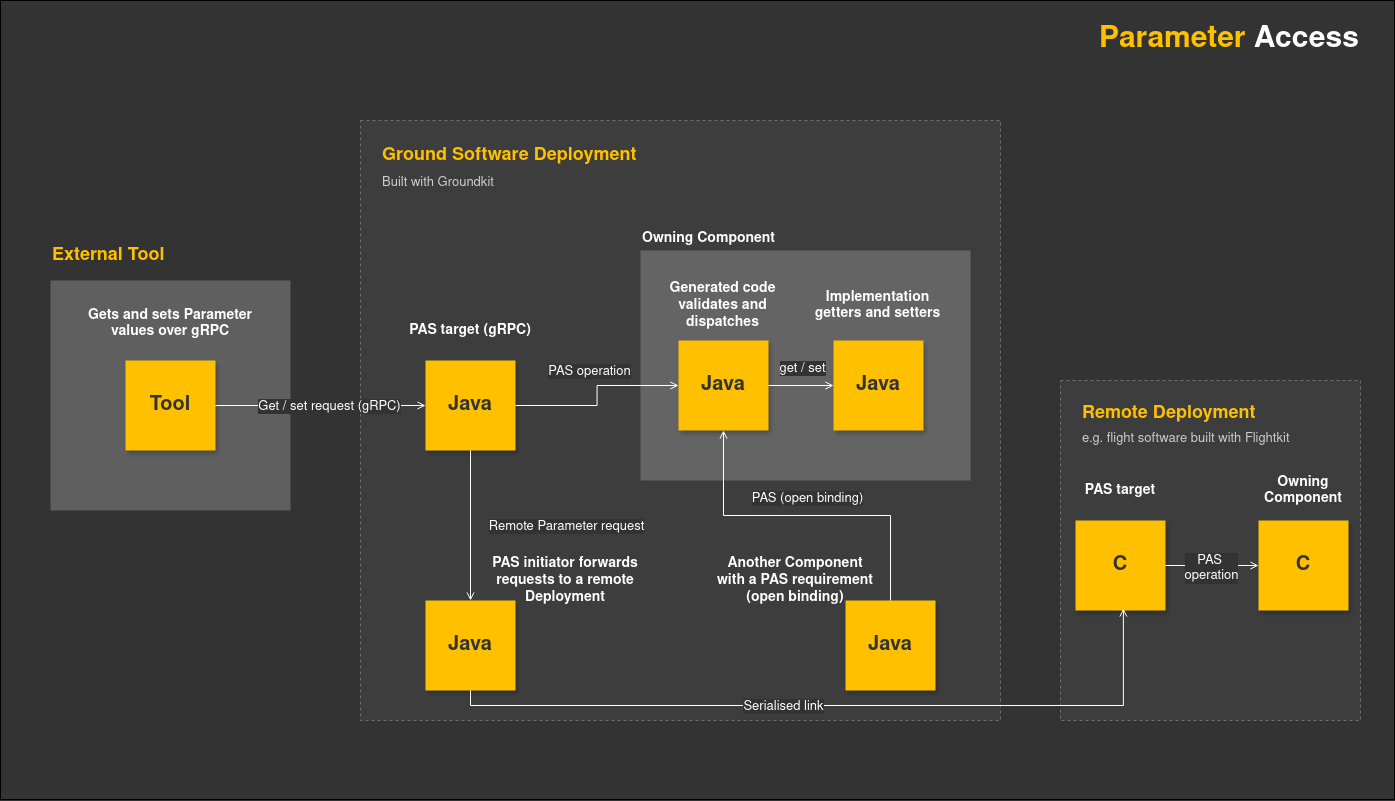
A Component that needs to access Parameters on other Components declares a PAS requirement within its Component Type, with an open binding, which allows it to access any Component in the Deployment that has Parameters.
Each PAS request identifies the Component that owns the Parameter, the Deployment it runs in, and the Parameter's index.
6.2. Access Across Deployments
Parameter requests are not limited to a single Deployment. The GroundkitFoundation Bundle provides pairs of initiator and target Component Types that forward PAS requests from one Deployment to another, over either of two transports. Over a serialised communications link, requests are serialised and carried over a communications stack; this path can reach flight software built with Flightkit, Groundkit's flight software counterpart, so ground software can get and set Parameters on board a spacecraft. Over gRPC, requests are carried between ground-side Deployments using gRPC, an open-source remote procedure call framework.
External tools can also get and set Parameters over gRPC, as the tutorials demonstrate using the Bruno API client.
7. Validation and Error Behaviour
PAS validates each request before it reaches the Component Implementation:
-
Parameter index - A request for an index the Component does not define is rejected with the
InvalidParamexception. -
Mutability - A set on a Read-Only Parameter is rejected with the
ReadOnlyexception. -
Row range - A request addressing rows outside the Parameter's range is rejected with the
InvalidRowexception. -
Buffer size - A value buffer of the wrong size is rejected with the
Overflowexception.
|
A successful set means the Component accepted the value. The Service does not validate the value itself, so whether an unsuitable value is adjusted or rejected depends on the Component Implementation's own setter logic, which varies between Component Implementations and the functionality being implemented. Performing a get confirms a Parameter's current value after a set. |
8. Initial Values
The model does not define initial values. The Component Implementation gives each Parameter its initial value, either by initialising the backing field directly, or by reading the value from the Initialisation Data its Deployment supplies. Initial values are applied whenever the Deployment starts.
Initialising the backing field directly gives the Parameter the same starting value in every Deployment. The SpacePacket Component Type does this for its error counters:
private final AtomicLong lenErrorCount = new AtomicLong(0);Reading the value from Initialisation Data instead gives each Deployment its own starting value. The Hello World 3 tutorial initialises its eventPeriod Parameter directly, in the field declaration; to read it from Initialisation Data instead, declare a field for it on the Component Type's Initialisation Data record, for example:
public record EventPublisherImplInitData(byte eventPeriod) {
}
Each Deployment supplies its own value in the init class for that Component instance:
public static final EventPublisherImplInitData INIT_DATA =
    new EventPublisherImplInitData((byte) 2);
The Component Implementation's constructor then reads the value from its Component Container, in place of the inline field initialiser:
eventPeriod = new AtomicInteger(container.eventPublisherInitData().eventPeriod());9. Parameters and the Mission Database
The Mission Database records a Mission's model. That model has a physical side, comprising the Mission's assets such as satellites and ground stations, and a functional side, comprising the software those assets run, down to each Component and its Parameters. The functional side carries the definition of every Parameter the Mission exposes: its name, its type, and whether it is read-only. External tools use these definitions to know what a Mission exposes and which asset it belongs to; the Parameter Access Service accesses the live values from a running Deployment.
10. Related Documentation
-
Tutorial: Hello World 2
-
Tutorial: Hello World 3
-
Tutorial: Using a Service
-
Reference: Reference Guide for HGK commands