Parameters
Overview
Parameters allow a Component to make named, typed values available to the rest of the flight software and to the ground.
A Parameter is a value that a Component Type declares as part of its model. Typical Parameters include status values, measurements read from hardware, and configuration values that change how a Component behaves. A Parameter's value can be queried, and in some cases modified, from other Components and from the ground.
|
Parameters are declared in a Component Type's |
Read-Only Parameters and Mutable Parameters
Parameters that can only be queried are called Read-Only Parameters. Parameters that can be both queried and modified are called Mutable Parameters.
Mutability is declared with the readOnly attribute on the <Parameter> element. The attribute defaults to false, so a Parameter is mutable unless it is declared with readOnly="true".
Across the Component Types that ship with Flightkit, Read-Only Parameters are typically measurements and status values, such as a temperature reading, a boot count, or an error counter. Mutable Parameters are typically configuration values, such as whether a logger is enabled or the period at which it logs.
|
Setting a Read-Only Parameter is rejected by the framework with the |
Declaring Parameters
A Component Type declares its Parameters in a <Parameters> element in its componentType.xml file. Each <Parameter> element gives the Parameter a name, a <Description>, and a <Type>, and may add a <Documentation> block for longer notes. By convention, Parameter names are camelCase, for example count or logPeriod.
The following declaration, from the Counter Component Type in the FlightkitFoundation Bundle, declares a read-only unsigned 8-bit integer Parameter:
<Parameters>
  <Parameter name="count" readOnly="true">
    <Description>
      The current count value
    </Description>
    <Type>
      <Integer signed="false" bits="8"/>
    </Type>
  </Parameter>
</Parameters>
Each Parameter is automatically assigned a numeric identifier from its position in the declaration order, starting at 0 for the first declared Parameter. There is no attribute for assigning an identifier by hand.
A <Parameter> declaration does not include an initial value. Initial values are set in the Component's initialisation code, described in Initial Values and Persistent Configuration.
Parameter Data Types
The <Type> element declares the Parameter's data type. A Parameter may use the following data types:
-
Boolean - a true or false value.
-
Integer - a whole number. The declaration states whether the value is signed and how many bits it occupies, from 1 to 64, for example
<Integer signed="false" bits="8"/>. -
Real - a floating-point number, that is, a number with a fractional part.
-
Bitfield - a value divided into one or more named groups of bits.
-
Blob - a binary large object: raw binary data, held as a vector of bytes.
-
List - a vector of values of another data type.
The Component Model supports further data types, such as Enumeration, String, and Structure. These cannot yet be used for a Parameter: the tooling rejects the model when it is loaded, naming the Parameter at fault.
|
Floating-point support can be excluded from a flight build. It is controlled by the |
Fixed and Variable-Length Vectors
Blob and List are vector types: they hold a sequence of elements rather than a single value. A vector declaration states its maximum length with the maxLength attribute, and whether its length can change with the fixed attribute:
-
fixed="true"- the vector’s length is constant. -
fixed="false"- the vector’s length can vary, up tomaxLengthelements. For example,<Blob fixed="false" maxLength="255"/>declares binary data of up to 255 bytes.
A List element must itself be a Boolean, Integer, Real, Bitfield, or fixed-length Blob. Lists cannot be nested.
The framework treats a vector Parameter as a multi-row value: each element is a row, and values are read and written as a range of rows rather than as a single value.
Generated Code and the Component Implementation
Flightkit is model-driven: you describe a Component Type in XML, and the tooling generates C source code from that description. For Parameters, running hfk component-type generate produces:
-
Accessor prototypes - the declaration of a get function for every Parameter, and of a set function for every Mutable Parameter, in
ComponentName_prototypes.h. The function names follow the patternComponentName_getParameterName()andComponentName_setParameterName(), for exampleCounter_getCount(). -
Parameter identifiers - a symbol for each Parameter's numeric identifier, in
ComponentName_ParamSrc.h. -
PAS plumbing - a table describing each Parameter, including its type, mutability, and size limits, together with the code that receives PAS requests, validates them, and dispatches them to your get and set functions, in
ComponentName_ParamSrc.c.
The generated code handles the PAS protocol; the behaviour behind each Parameter is yours to write in the Component Implementation:
-
The get and set function bodies - in the Component Implementation source file,
ComponentName.c. The generated Template File contains a placeholder body for each function that returns a not-implemented status until you replace it. -
Backing state - whatever those bodies need in order to hold, derive, or read the value: commonly a member of the Component's C structure in
ComponentName.h, though a Parameter may equally be read straight from hardware. This differs from one Component to the next. -
Initialisation - any starting values the Component needs, set in its
localInit()function.
|
Generated files should not be edited by hand. Changes to a Parameter belong in |
|
Refer to the Hello World 2 tutorial to add a Read-Only Parameter to a Component Type, and the Hello World 3 tutorial to add a Mutable Parameter. |
The Parameter Access Service
Parameters are accessed through the Parameter Access Service (component.PAS), a Service that defines the Operations for accessing the Parameters declared by Component Types.
|
Any Component Type with at least one Parameter automatically provides PAS through its container, the generated code that connects a Component to the framework. PAS does not need to be declared in |
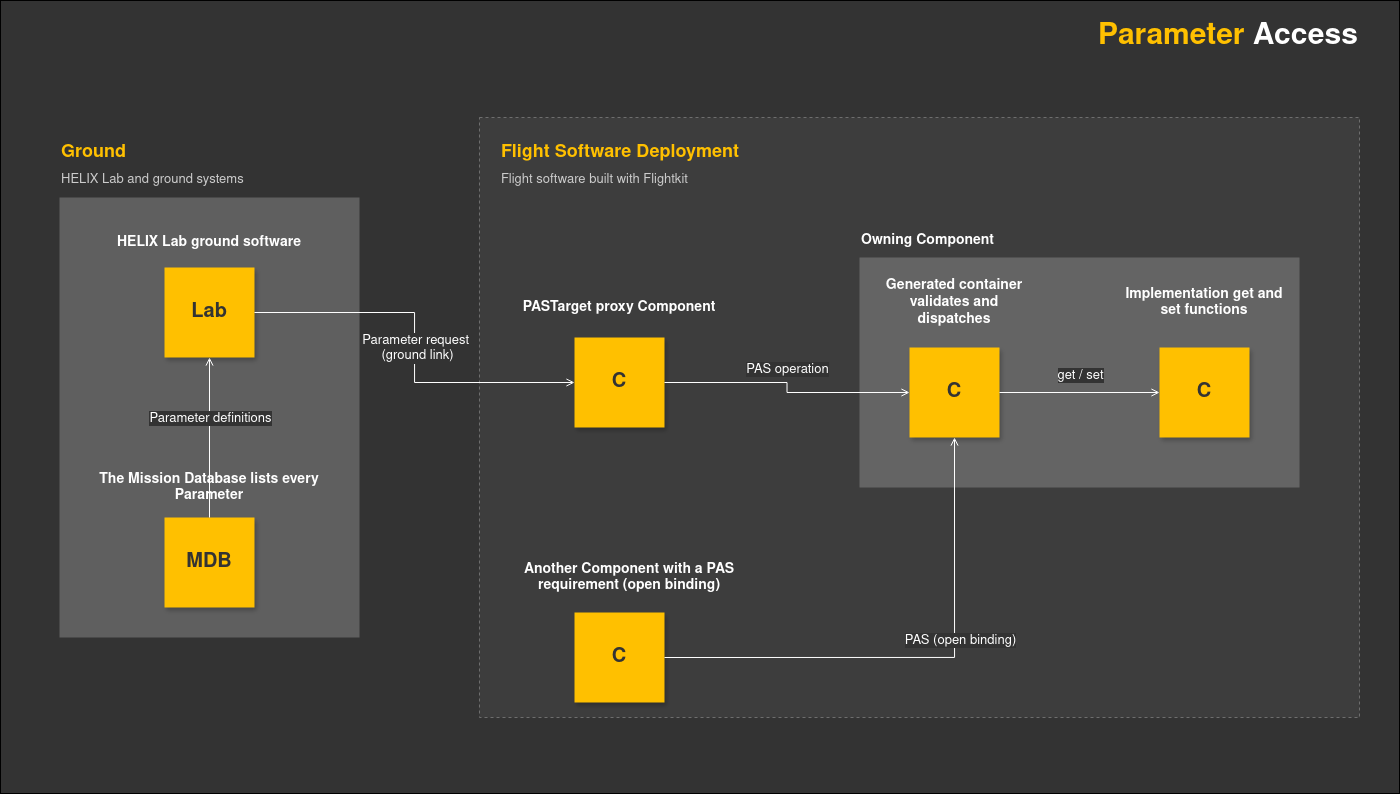
PAS Operations
PAS Operations let a caller:
-
Query how many Parameters a Component has.
-
Query each Parameter's description, including its type, mutability, size limits, and current size.
-
Get and set scalar values.
-
Get and set multi-row values, by row range.
Accessing Parameters from Other Components
A Component that needs to access Parameters on other Components declares a PAS requirement with an open binding in its componentType.xml. Refer to the Components Feature Guide for more information about Services, requirements, and bindings.
Accessing Parameters from the Ground
A Deployment that supports ground access to Parameters includes a PASTarget Component, which acts as a proxy: it receives Parameter requests over the ground link and forwards them as PAS Operations to the Component that owns the Parameter.
Ground software learns which Parameters exist from the Mission Database (MDB), a machine-readable description of the Mission's software that the tooling generates. The MDB records every Parameter's name, type, mutability, and identifier.
HELIX Lab reads the MDB and presents each Component's Parameters with controls for getting and setting their values. Other HELIX systems use the MDB in the same way.
Validation and Error Handling
The framework validates every PAS request before the Component's get or set function is called. A request that fails validation is rejected with an exception:
-
InvalidParam- the Parameter identifier does not match a Parameter on the Component. -
ReadOnly- the request attempts to set a Read-Only Parameter. -
InvalidRow- the requested row range is not valid for the Parameter. -
Overflow- the supplied buffer is the wrong size for the value.
The framework validates only the shape of a request. Validating the content of a value is the responsibility of the Component that implements the set function.
|
A successful set means that the Component accepted the value; it does not guarantee that the Parameter now holds that exact value. Whether a value is checked, adjusted, or stored unchanged depends on the Component Implementation. Performing a get confirms the Parameter's current value. |
Each successful get also returns a time associated with the value. By default this time represents the moment of the read; a Component can instead return the time at which the value was actually captured.
Protecting a Parameter's backing storage against simultaneous access from more than one Task is the Component Implementation's responsibility. A common approach is to hold the Component's Lock in the get and set function bodies.
Initial Values and Persistent Configuration
A <Parameter> declaration has no initial value. A Parameter's starting value comes from the Component Implementation, typically set in its localInit() function.
By default, Parameter values do not survive a restart of the flight software; each restart runs the initialisation code again.
A Component can opt in to persistent configuration to preserve state across restarts:
-
the Component Implementation is declared as configurable in the model, by setting
configuration="true"on its<Implementation>element incomponentType.xml, and -
individual Parameters are marked with
config="true".
The values of config Parameters then form part of the Component's saved configuration. After a restart, the framework hands that saved configuration back to the Component Implementation through its ComponentName_setConfig() function, once local initialisation has run; what it does to each Parameter's value from there is up to the implementation. A Component with no saved configuration keeps the defaults set in its initialisation code.
Refer to the Components Feature Guide for more information about the configuration functions a Component Implementation provides.
Parameters and Telemetry
Parameters are the values that Flightkit's telemetry Component Types read and report. This includes housekeeping telemetry: Parameter values that a Deployment sends to the ground on a periodic schedule.
The FlightkitFoundation Bundle includes Component Types that build telemetry from Parameters. The cdh.tm.Beacon Component Type stores Beacon definitions, each naming a set of Parameters, and periodically reads and reports their values. The cdh.tm.Aggregator Component Type combines the values of a configured list of Parameters into a single value suitable for downlink or logging. Because these Component Types use PAS requirements with open bindings, they can reach any Parameter in the Deployment.
Related Documentation
-
Feature Guide: Components Feature Guide
-
Tutorial: Hello World 2
-
Tutorial: Hello World 3
-
Reference: Flightkit Component Type Layout Reference